

We’ve lost count of how many times an SMB we’re working with upgraded from free to paid AI and said some version of “I had no idea!”
The free tiers are useful. The paid tiers are transformational. If you haven’t made the jump yet, you’re leaving an enormous amount of capability on the table, often for less than the cost of a streaming subscription. If you were to max out the rate limits on a $20/month Gemini plan, your cost would be $0.00000033 per page at a maximum capacity of 60M pages of text. If you did the same with the free plan of ChatGPT, you’d only produce 7,500 pages in a month and the level of intelligence in those pages would be meaningfully lower.
As you wrap up the year and work to lock down your budgets for 2026, don’t be penny wise but pound foolish when it comes to your investments in GenAI.
📰 What’s Happening in GenAI
Four+ New Frontier Models
ChatGPT, Gemini, Grok, and Claude all released new, more powerful models. OpenAI released ChatGPT 5.1 (as well as 5.1 Pro and a specialized coding model). Anthropic released Claude Opus 4.5 just last week; in early testing it performs incredibly well. Google released Gemini 3, which has quickly become our new favorite collaborator. X.ai released Grok 4.1, which we’re still testing.
Maturing GenAI Tools
Along with a slew of new models, most of the major frontier labs made big updates to their core products. Claude brought Claude Code to the browser plus released Skills (fingers crossed this becomes an open standard like MCP). ChatGPT and Gemini both released multiple new shopping tools integrated into their consumer apps. Gemini released Antigravity, their own coding tool. They also made truly massive improvements to NotebookLM - too many to list here.
(Almost) Pixel Perfect
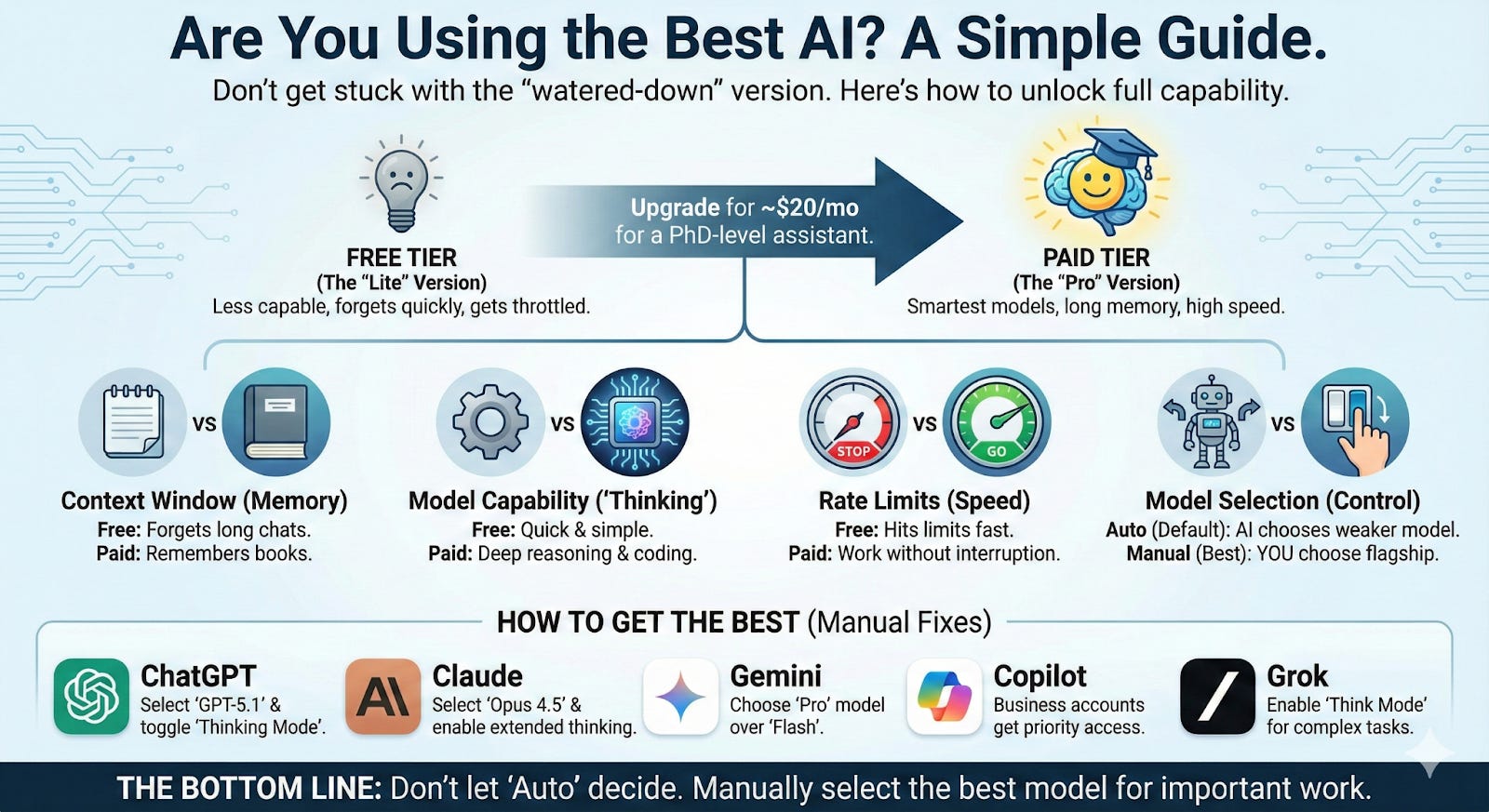
Gemini 3’s launch was followed-up a day later by their release of Nano Banana Pro, which is the current state of the art (SOTA) image generation model. It’s hard to describe how powerful this model is; go try it right now. Folks are already using it to design packaging and then in one step get full die cuts. To give you a sense of what it can do, we gave it the final draft of this post and the prompt “make this post into an infographic” - one shot. 🤯
How to Use the Most Powerful GenAI
Generative AI is simultaneously the most powerful technology humankind has ever created and the most equitably distributed technology humankind has ever created.
For as little as $20/month, pretty much anybody on earth can access incredibly capable generative AI. The same GenAI capabilities available to Fortune 500 companies are available to a small consulting shop in the midwest or a mid-sized manufacturer in Florida.
But only if you know where to look, how to pick, and what settings to turn on.
The landscape has become genuinely confusing. Five major platforms. Multiple model generations. New models launched monthly. Free tiers, paid tiers, business tiers. “Thinking” modes that may (or may not) be enabled. Rate limits that quietly shift to weaker models mid-conversation.
Here’s what nobody’s saying clearly: the version of AI you’re using right now might be dramatically less capable than what’s available—sometimes on the same platform you’re already paying for.
This post is all about helping you fix that. This isn’t a comprehensive specs comparison. A practical guide to understanding what you’re actually getting and what you need to do to access each platform’s most capable models.
Four Factors
Every AI lab faces the same constraint: compute is finite. The most capable responses—especially those using extended “thinking” or “reasoning” modes—require 10-100x the processing power of a quick answer. Labs can’t give everyone unlimited access to their best models all the time. The GPUs simply don’t exist (yet).
Instead, they tier access based on what you’re paying and how much you’re using. Understanding these four factors tells you whether you’re getting a platform’s best or a watered-down version.
1. Context Window
The context window is how much text the model can “hold in mind” during a conversation, inclusive of your prompt, any uploaded documents, and the conversation history combined. Generative AI is metered, and context windows are measured, in tokens. A token is basically a portion of a word.
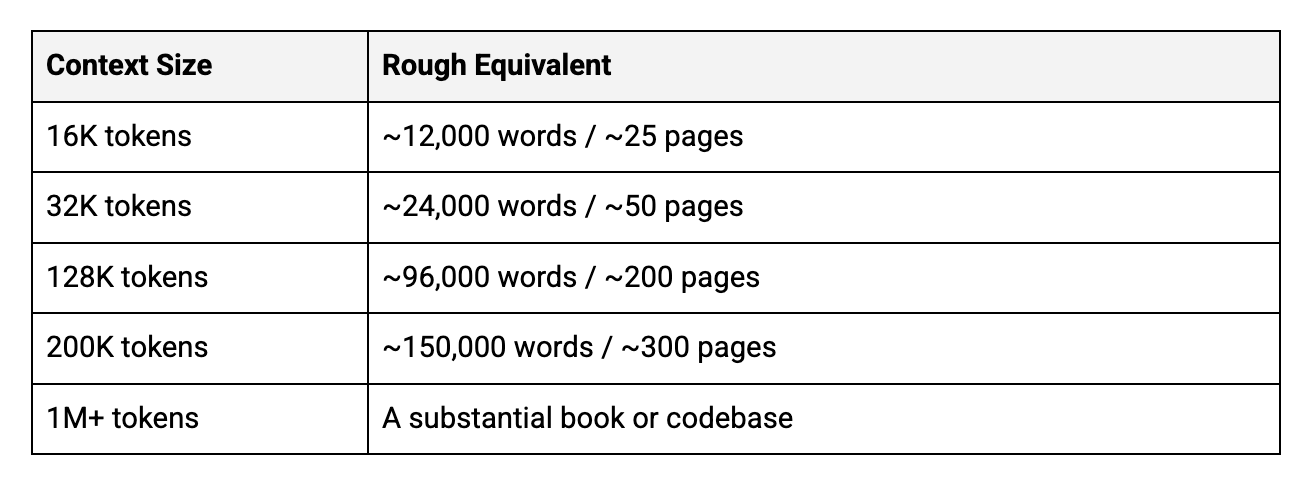
Why it matters: If you’re analyzing long documents, working across multiple files, or having extended conversations, a small context window means the AI “forgets” earlier material. Free tiers typically offer smaller windows; the free version of ChatGPT runs out of its context window after only ~18 pages of text.
2. Model Capability
The frontier labs building generative AI models are on a mission to build AGI, artificial general intelligence. Until they achieve this goal, each successive model they release is primarily a stepping stone to the next iteration. As such, they are relentlessly releasing new models (four in the past month!). As new models are released they are typically offered first to paying customers while older models are then offered to free plans before they’re completely retired.
On top of this endless flow of models, most platforms now offer thinking or reasoning modes that apply extended compute to hard problems. Remember when we used to start prompts with, “take a deep breath and think about this step by step”? The reasoning models have a bit of that approach baked in; rather than immediately generate a response, they have an internal monologue that “thinks” before it responds. This uses dramatically more compute but also produces substantially better results for coding, analysis, math, and multi-step reasoning
The capability gap between a quick response and a “thinking” response on the same model can be larger than the gap between different models entirely. Unless you’re building a product that needs sub-second responses, waiting for the smarter answer is almost always the right tradeoff for knowledge work.
Personally, I almost always use the thinking models. When they launched ChatGPT 5, OpenAI noted that only ~8% of all ChatGPT users had ever tried a thinking model.
3. Rate Limits
Every platform caps usage. There are limits on the number of messages you can send per hour, weekly caps across all usage, and “dynamic throttling” which shifts you to lighter models when you hit limits. Sometimes without notifying you 🙁.
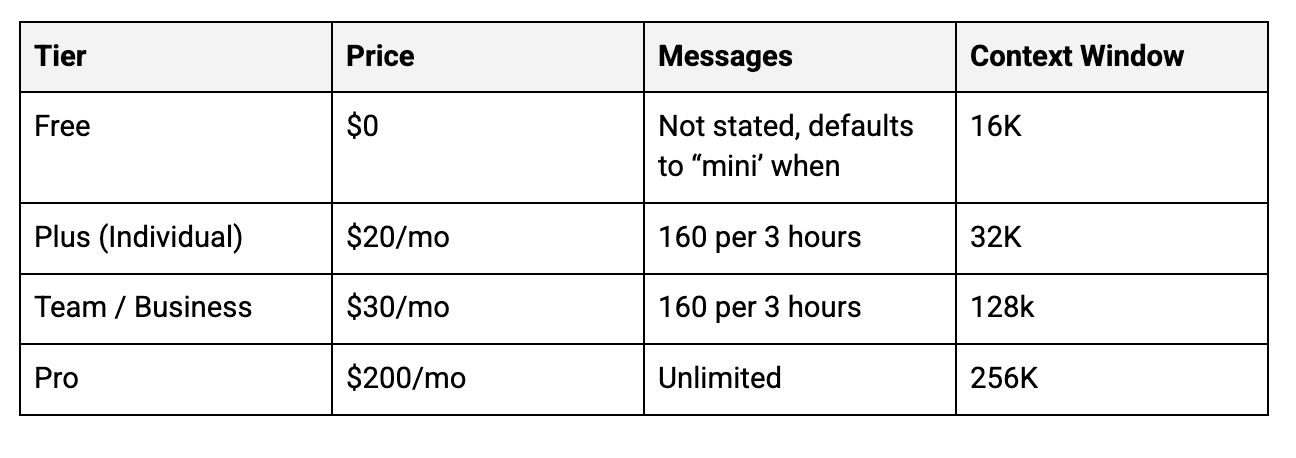
Rate limits are where free vs. paid diverges most dramatically. A free tier might give you 10 substantive messages per day whereas a paid tier might give you more than 160 every 3 hours.
4. Auto-Routing
This is the sneakiest issue.
Some platforms default to “auto” or “router” modes that choose the model for you based on your query. The lab decides whether your question deserves the flagship model or can be handled by something lighter and faster.
Unfortunately, GenAI often underestimates complexity. A question you know requires deep reasoning might get routed to a fast, shallow model because it doesn’t look complex on the surface.
The fix is simple; manually select the model you want. Every platform allows this. Don’t let the system decide for you on important work.
The Most Powerful GenAI, Platform-by-Platform
ChatGPT (OpenAI)
GPT-5.1 runs in “Instant” (fast) and “Thinking” (extended reasoning) modes. Paid users get access to “Pro” mode, even more compute for the hardest problems.
How to access the best version:
Click the model selector dropdown—don’t accept “Auto”
Choose GPT-5.1 explicitly
For complex work, toggle to Thinking mode (if available on your tier)
Watch for degraded responses that signal you’ve hit a limit
Is $20+/month worth it? Yes. The jump from 10 messages/5 hours to 160 messages/3 hours is the difference between “occasional helper” and “viable work tool.”
Claude (Anthropic)
Opus 4.5 is their most capable model and works well with large chunks of text or code. Sonnet 4.5 performs similarly to Opus 4.5, although . Haiku 4.5 is their fast and light model; honestly, I almost never use it. Extended thinking available across models.
How to access the best version:
Click the model name at the top of any chat
Select Opus 4.5 for complex reasoning work
Enable extended thinking (click the clock/timer icon in the chat controls)
Use Projects to maintain context across conversations
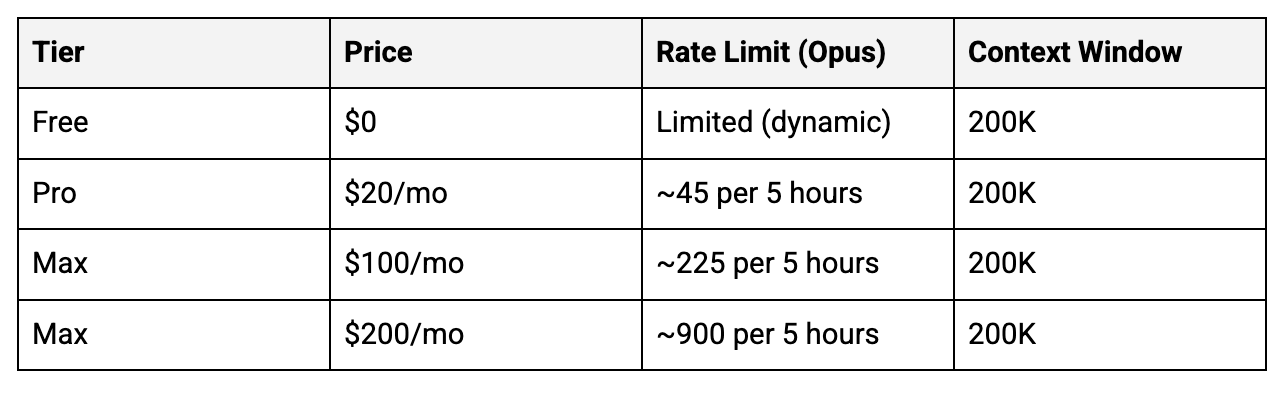
Is $20+/month worth it? Absolutely. Free Claude doesn’t give you Opus 4.5 at all; you’re on the previous generation. Claude is my primary GenAI model; I’m on the $100/month Max plan but regularly go over. Claude is unique in that, in the Max plans, you can add a credit card and pay per-token for any overages rather than being locked out until your rate limits reset.
Gemini (Google)
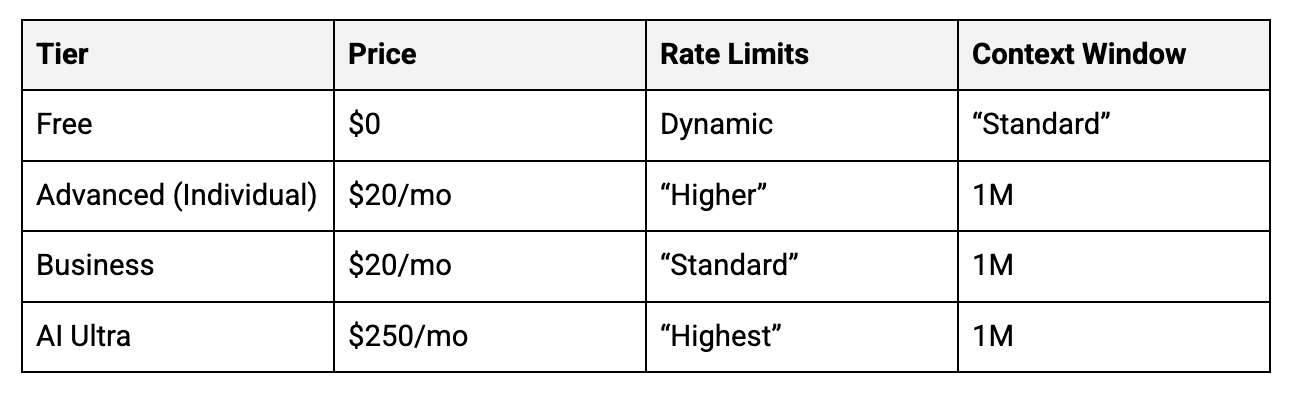
With the launch of Gemini 3, Google’s taken a different approach. There are just two models offered, Gemini 3 “Fast” and “Thinking 3 with Pro”; free users can only access Fast.
How to access the best version:
Check your model selection before important work
Choose “Thinking”
Is $20/month worth it? If you run on Google Workspace and want GenAI integrated across Docs/Sheets/Gmail/Meet, this is a no-brainer. The $249.99/month Ultra tier is harder to justify unless you specifically need Deep Think or experimental Agent features.
Copilot (Microsoft & OpenAI)
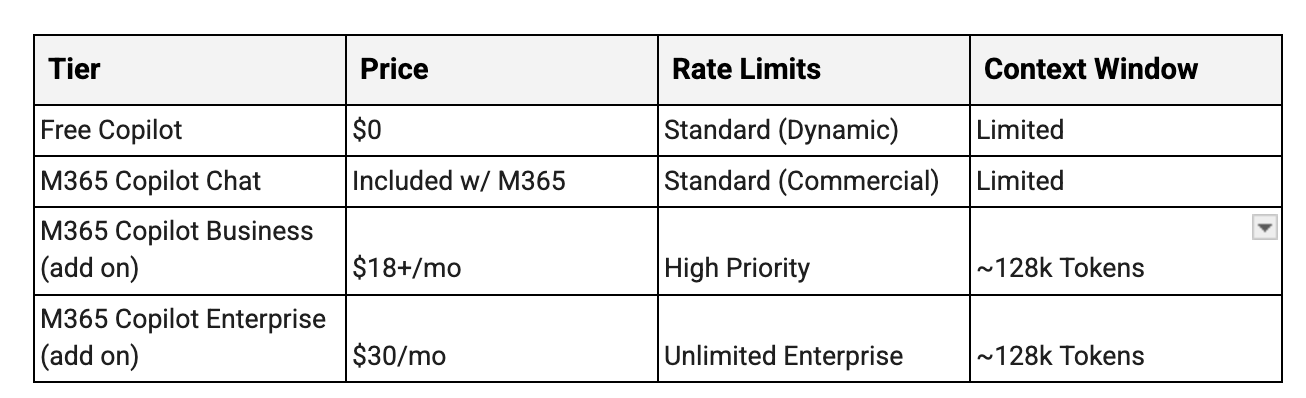
While Copilot is not a frontier model itself, it is the primary way that many people access GenAI at work. As of this writing, you can access both Claude and ChatGPT via Copilot, depending on your plan and what your admin has enabled.
How to access the best version:
Understand that “standard access” means possible degradation during busy periods
For business accounts: ask your IT admin if Claude models are enabled (they’re optional add-ons)
Don’t confuse consumer Copilot with M365 Copilot—different products, different capabilities
Is $18+/user/month worth it? Now that ChatGPT, Gemini, and Claude can all deeply connect into the Microsoft ecosystem, it’s getting harder to justify spending much on Copilot. We consistently hear frustrating stories about Copilot, especially their “agent,” Copilot Studio. If you’ve only used Copilot so far, we recommend you experiment with Gemini, ChatGPT, and/or Claude with their M365 connectors turned on.
Grok (xAI)
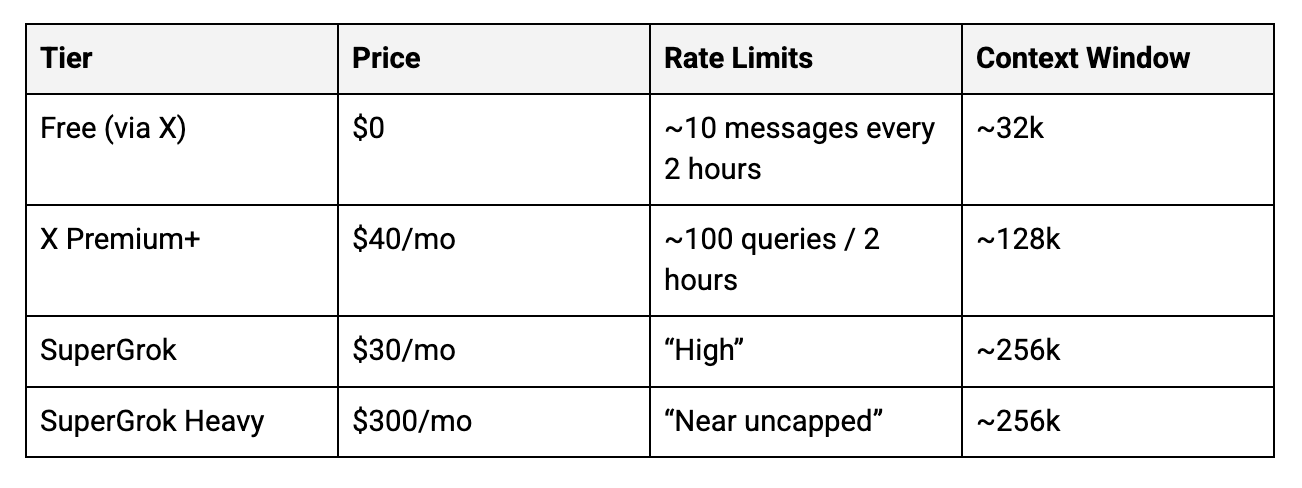
Currently, you can access Grok 4 Fast, Expert, and Heavy as well as Grok 4.1 and “SuperGrok”, which requires an upgraded plan.
How to access the best version:
Pick “Expert” or Grok 4.1 rather than Fast or defaulting to “Auto”.
If you want Grok without X, SuperGrok works standalone
Is $30-40/month worth it? Grok’s real-time X data integration is unique. If you need current information (market sentiment, breaking news, trend analysis), it offers something others don’t. For pure reasoning, ChatGPT or Claude may be better value and are more full-featured products.
The Bottom Line
If you’re using free tiers, you are almost certainly using significantly less capable AI than what’s available. Every platform throttles free users through message limits, model downgrades, or reduced reasoning modes.
The gap matters. In my experience, the difference between free and paid tiers is roughly equivalent to asking a smart undergraduate versus a PhD researcher for help with a complex problem. Both can help. One helps much more effectively.
$20-30/month is less than most streaming subscriptions. If AI is genuinely part of how you work, the upgrade from free to paid is one of the highest-ROI investments available right now.
Check what you’re actually running. Select models manually instead of accepting auto-routing. Enable thinking modes for complex work. Consider whether the paid tier delivers enough additional value to justify the cost.
For most knowledge workers, it does.
Questions? Email us at info@remixpartners.ai - we read every message.